Team operations
Youth sports communication app for parents, players and renewals
Send an update to one group or the whole club by email and SMS, and let SpotBasket OS remind families when a membership is about to run out.
Send an update to one group or the whole club by email and SMS, and let SpotBasket OS remind families when a membership is about to run out.
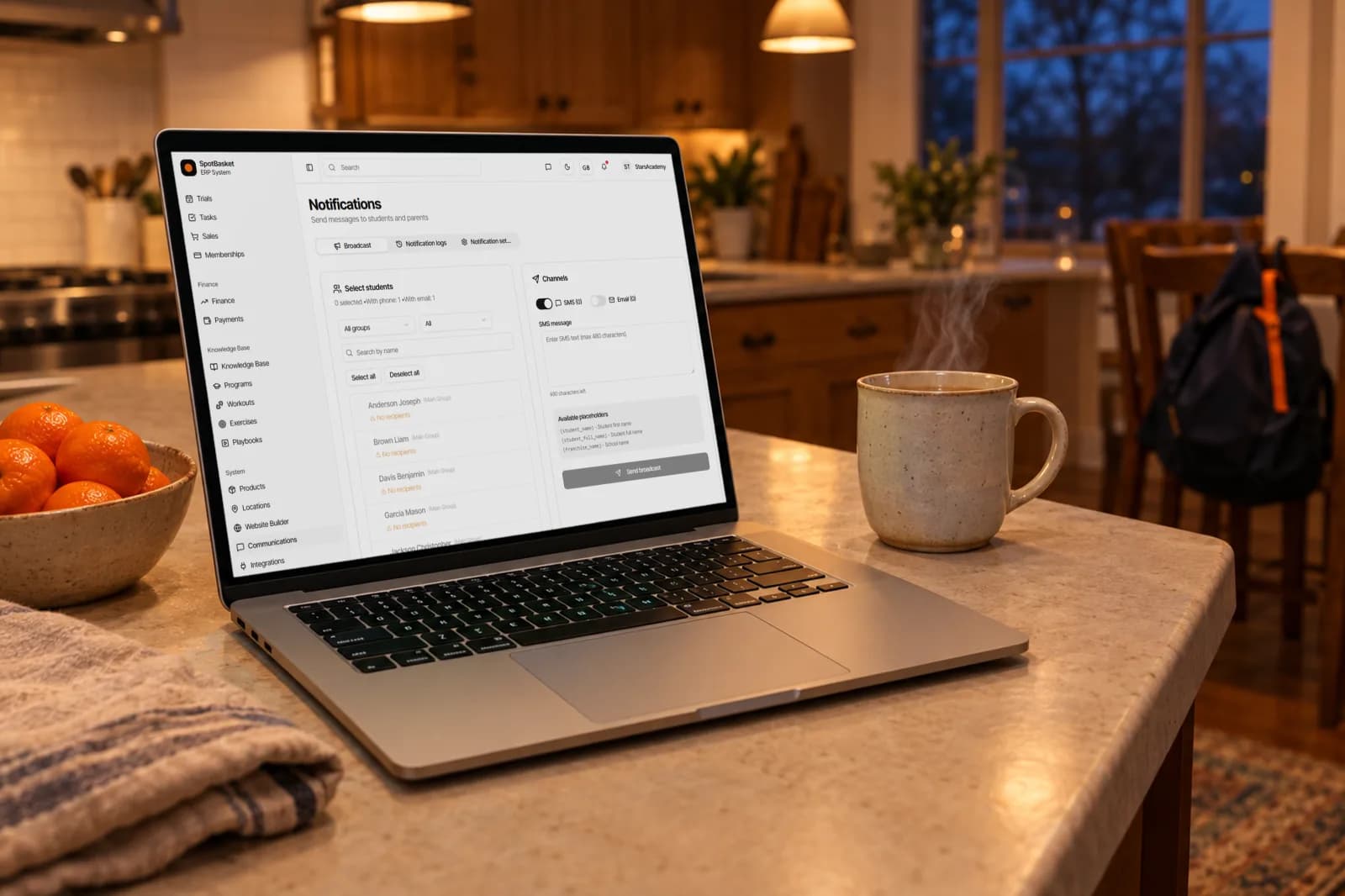
SpotBasket Communications is the messaging module of SpotBasket OS. Staff send email and SMS broadcasts to students and parents, filtered by group or membership status, with personalized placeholders. Automatic reminders go out when a membership is expiring, has expired or is running low on sessions, and a delivery log shows the status of every message.
Write one message and send it by email, SMS or both to the players and parents you select.
Filter recipients by group and by membership status: active, expiring, expired or no membership.
Insert the player's name, the club name and other fields so every message reads as personal.
Remind families a set number of days before a membership expires, when it has expired and when sessions run low.
Edit SMS text, email subject and body for each reminder, choose the send time and send a test first.
See every message by channel, type and status: pending, sent, delivered or failed.
Group chats bury important updates under replies, and parents who mute them miss the practice that moved. SpotBasket Communications sends announcements the way clubs actually need them: pick recipients by group or membership status, write the message once, and send it by email, SMS or both. Search and select individual students when a message is only for a few families.
Placeholders such as the student's first name, full name and the club name make each message personal without extra work. Everything you send lands in a log with its channel and delivery status, so when a parent says they never got the message, you can check. Replies come back through the phone and email your club already uses.
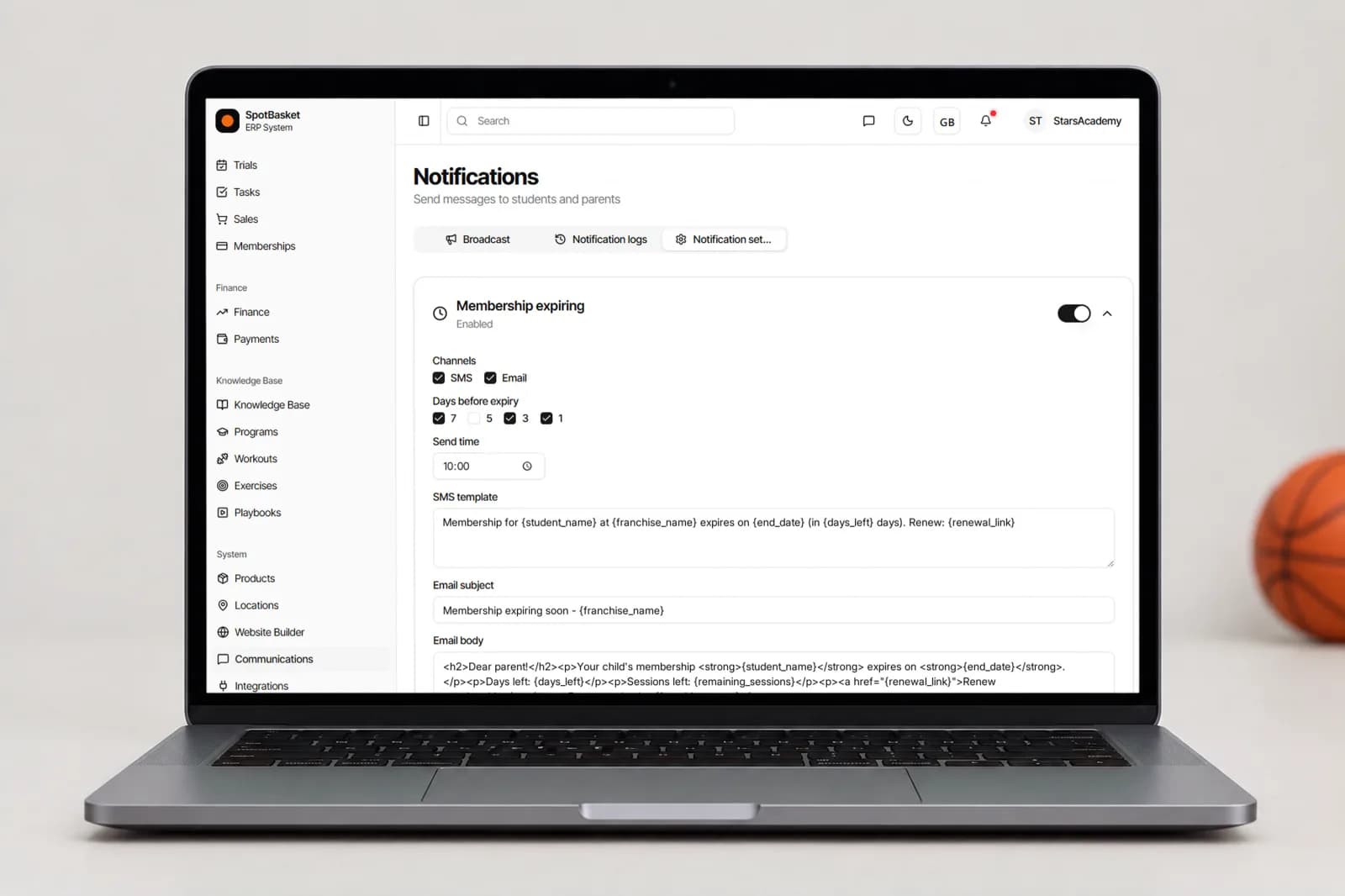
Chasing renewals is the most repetitive job in a club office. SpotBasket OS handles it with three automatic notifications: membership expiring, membership expired and sessions running low. Turn each one on, choose email, SMS or both, set how many days before expiry it goes out and the time of day it is sent.
Each reminder has its own SMS and email template with placeholders for the membership name, expiry date, days left, remaining sessions, price, club phone and a renewal link. Send a test to your own phone before switching it on. From then on, families get a clear, timely reminder and your staff spend their time on the ones that need a call.
Membership status filters turn broadcasts into a retention tool. Select everyone whose membership expired last month and send a personal note about the new season, or message families with no active membership about an open trial week. Because recipients come from live club data, the list is always current, with no exported spreadsheet to clean up first.
Staff get messages too. When a parent submits the registration form on your club website, SpotBasket OS can send an SMS to the phone numbers you choose, so a new inquiry does not wait until someone checks the inbox. Combined with the delivery log, the club knows what was sent, to whom and whether it arrived.
| Without SpotBasket OS | With SpotBasket OS | |
|---|---|---|
| Announcing a change | Posting in several WhatsApp groups | One broadcast by email and SMS to the right groups |
| Reaching the right families | Everyone gets everything | Filter by group and membership status |
| Renewal reminders | Admin checks expiry dates and texts by hand | Automatic reminders before and after expiry |
| Low session balance | Discovered at the front desk | Sessions-running-low reminder goes out automatically |
| Proof a message was sent | Scrolling back through chats | Delivery log with status per recipient |
Create your account at app.spotbasket.com and import students with parent phone numbers and emails.
Check that families have phone numbers and emails on file, and connect an SMS service in Integrations if you want to text them.
Turn on expiring, expired and sessions-low reminders, edit the templates and send yourself a test.
Choose a group, write the update and check the delivery log once it goes out.
The best way is a single channel parents can rely on for important updates, separate from social chat. SpotBasket OS sends email and SMS broadcasts filtered by group or membership status, logs every message and automates renewal reminders, so parents get fewer, clearer messages that reach the right families.
Yes, SpotBasket OS sends automatic reminders when a membership is about to expire, has expired or is running low on sessions. You choose the channels, how many days before expiry, the send time and the wording, including placeholders for the price, expiry date and a renewal link.
Yes, SpotBasket OS sends SMS through an SMS service connected in the Integrations section, alongside email. Broadcasts and automatic reminders can use either channel or both, and each message appears in the delivery log with its status. Before switching a reminder on, you can send a test to your own number.
No, SpotBasket Communications is for announcements and reminders rather than open group chat. Staff send targeted email and SMS messages and track delivery; parents reply through your usual phone and email. That keeps important updates from getting lost in a busy chat thread.
Yes, recipients can be filtered by group and by membership status, such as active, expiring, expired or no membership. You can also search and pick individual students, and the screen shows how many recipients have an email or phone number before you send.
Yes, each automatic reminder has an editable SMS template and an email subject and body. Placeholders fill in the student's name, membership name, expiry date, days left, remaining sessions, price, club name, club phone and renewal link. You can reset to defaults and send a test at any time.
Tell us how your club works today. We will show the modules that matter to you — groups, schedule, payments, player development and coaching tools — in a 30-minute call.